
Every field should justify its place

An effective form asks for the minimum information needed to respond well, explains what happens next, and works without errors on mobile or keyboard.

The label and hint explain what is requested and how it will be used.
Source · GOV.UK Design System
Supported byNielsen Norman Group: usability heuristics
Why asking too much reduces inquiries
Unnecessary fields, vague errors, and silence after submission make interested people abandon or repeat a request.
How to design submission, error, and follow-up

Justify every field through a later decision. Move deep qualification into a second conversation when it is not needed for the first response.
Implementation checklist
- Define what the team needs to act.
- Remove or postpone fields without proven use.
- Use visible labels and specific errors.
- Show expected response time and channel.
- Measure submissions, abandonment, quality, and follow-up.
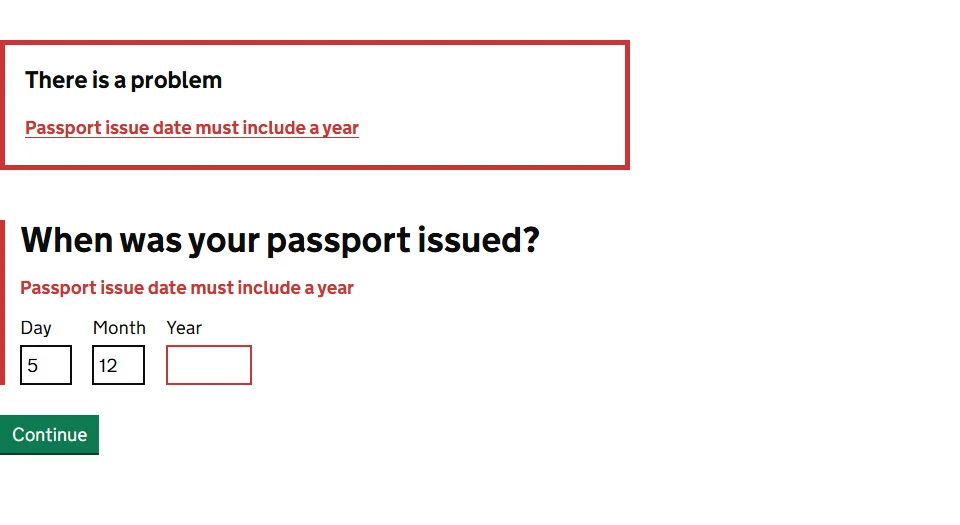
The summary links errors to the fields the person needs to correct.
Source · GOV.UK Design System
Supported byW3C: Web Content Accessibility Guidelines 2.2
Measures for quality and completion
Measure starts, field abandonment, submission rate, errors, qualified leads, response time, and notification deliverability.
Ask only for information you will use
Every field should change the reply, route, or priority of the inquiry. If you cannot explain its purpose, remove it or ask later.
Explain what happens after submission: who replies, through which channel, and within what time. That certainty reduces duplicate submissions and abandonment.
Test errors, keyboard use, mobile devices, and confirmations. A form that records the lead but leaves the user uncertain is still broken.
Tests using a real inquiry
- Complete it by keyboard only.
- Trigger and correct every error.
- Submit on a slow phone.
- Confirm receipt and follow-up.
Supported byGOV.UK: user research
Quick execution map
| Element | What to review | Quality signal |
|---|---|---|
| Intent | An effective form asks for the minimum information needed to respond well, explains what happens next, and works without errors on mobile or keyboard. | The answer is clear within seconds. |
| Implementation | Justify every field through a later decision. Move deep qualification into a second conversation when it is not needed for the first response. | There is one concrete and assignable action. |
| Measurement | Measure starts, field abandonment, submission rate, errors, qualified leads, response time, and notification deliverability. | The data should change a decision. A report with no action adds work. |
Frequently asked questions
What does contact form optimization mean in practice?
An effective form asks for the minimum information needed to respond well, explains what happens next, and works without errors on mobile or keyboard.
What is a sensible first step for contact form optimization?
Define what the team needs to act. Then continue with this action: Remove or postpone fields without proven use.
Which problem should contact form optimization prevent?
Unnecessary fields, vague errors, and silence after submission make interested people abandon or repeat a request.
How do you measure progress with contact form optimization?
Measure starts, field abandonment, submission rate, errors, qualified leads, response time, and notification deliverability.