
CRM cleanup starts with a decision

CRM cleanup organizes contacts, companies, sources, stages, consent, and owners so follow-up becomes reliable.
Duplicate data that contaminates follow-up
If fields are inconsistent, the team does not know whom to contact, what to offer, or which automation to trigger.
Supported byturn integrity requirements into verifiable data rules
How to correct records without losing history

Define a few required fields and simple rules before importing, automating, or reporting.
Implementation checklist
- Delete or merge duplicates.
- Normalize sources and stages.
- Define minimum fields by lead type.
- Record consent and preferences.
- Assign owners and follow-up dates.
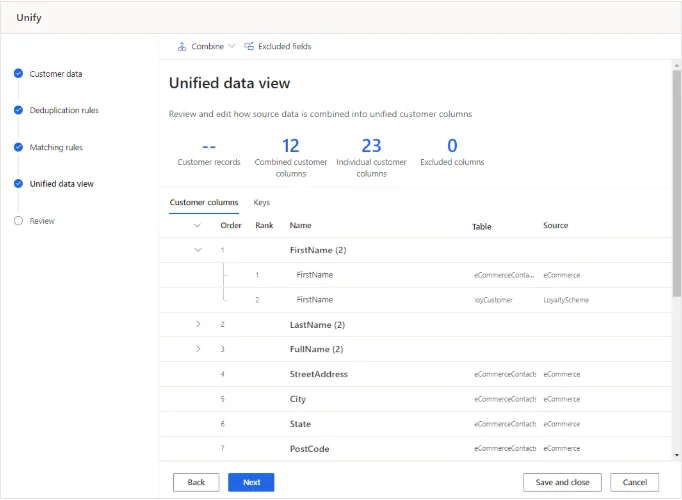
Merging retains selected fields from each source.
Source · Microsoft Learn
Supported bynormalize fields and test matching rules before merging records
Controls that keep disorder from returning
Measure duplicates, incomplete fields, ownerless leads, overdue tasks, contactability, and conversion by stage.
Data cleanup starts by deciding what deserves to exist
Removing duplicates helps, but it does not fix unused fields or definitions that vary across teams. Before correcting records, document what each field means, who creates it, and which decision it supports. A field without proven use only accumulates errors.
Work by risk and value. Bounced emails, permissions, sales status, and missing ownership affect current operations. Cosmetic normalization can wait. Keep a backup, record rules, and test a sample before changing the entire database.
Prevent the mess from returning. Use validation, controlled values, and small automations. Assign a regular review too. No CRM stays clean when imports and forms can write uncontrolled variations.
A safe cleanup order
- Back up and define rules before transforming.
- Correct consent, contact, ownership, and status.
- Merge duplicates with field-level survival rules.
- Block sources that reintroduce the error.
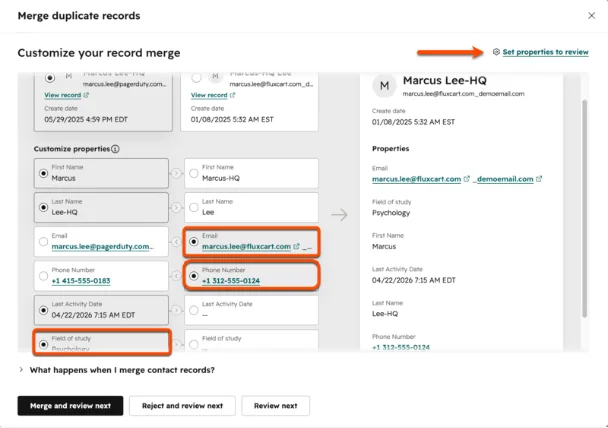
Compare properties before deciding which record to keep.
Source · HubSpot
Supported byautomatic and unique-identifier deduplication methods
Quick execution map
| Element | What to review | Quality signal |
|---|---|---|
| Intent | CRM cleanup organizes contacts, companies, sources, stages, consent, and owners so follow-up becomes reliable. | The answer is clear within seconds. |
| Implementation | Define a few required fields and simple rules before importing, automating, or reporting. | There is one concrete and assignable action. |
| Measurement | Measure duplicates, incomplete fields, ownerless leads, overdue tasks, contactability, and conversion by stage. | The data should change a decision. A report with no action adds work. |
Frequently asked questions
What does CRM data cleanup mean in practice?
CRM cleanup organizes contacts, companies, sources, stages, consent, and owners so follow-up becomes reliable.
What is a sensible first step for CRM data cleanup?
Delete or merge duplicates. Then continue with this action: Normalize sources and stages.
Which problem should CRM data cleanup prevent?
If fields are inconsistent, the team does not know whom to contact, what to offer, or which automation to trigger.
How do you measure progress with CRM data cleanup?
Measure duplicates, incomplete fields, ownerless leads, overdue tasks, contactability, and conversion by stage.