

Mobile experience happens under pressure
A good mobile experience lets people complete primary tasks with readable text, reachable controls, stable loading, and forms matched to the right keyboard.
Supported byNielsen Norman Group: usability heuristics
Problems a narrow desktop window does not show
Tests on a monitor do not reveal imprecise fingers, slow networks, browser bars, or real interruptions.
How to test tasks with one hand
Test on physical devices of different sizes and under constrained conditions. Observe complete tasks, not screenshots alone.
Implementation checklist
- Navigate and complete tasks with one hand.
- Check the size, spacing, and state of controls.
- Use forms with real keyboards and autofill.
- Test slow loading, rotation, and resuming.
- Review hidden content, layout shifts, and errors.
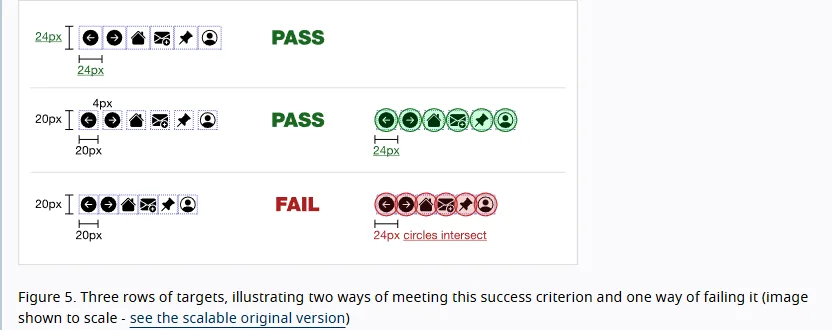
Spacing between controls also determines whether taps can be accurate.
Source · W3C WAI
Supported byweb.dev: Core Web Vitals metrics
Field data for prioritization
Measure mobile conversion, interaction errors, form abandonment, loading times, layout shifts, and task success.
Test with thumbs, haste, and a weak signal
A narrow desktop window does not represent mobile use. Test while standing, with one hand, and on a limited connection to uncover real problems.
Keep frequent actions within reach and leave enough space between controls. A mistaken tap is a design failure, not user clumsiness.
Avoid loading resources that do not support the task. On mobile, decorative animation competes directly with speed and battery.
Tasks to observe
- Find key information.
- Compare an offer.
- Complete a form.
- Return after an interruption.
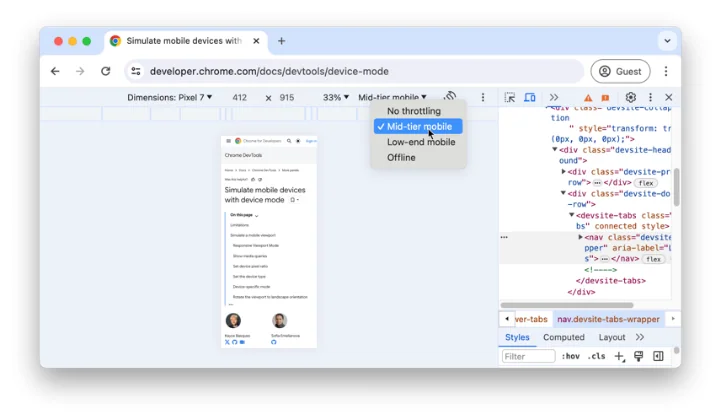
Simulated slow loading complements testing on real phones.
Source · Chrome for Developers
Supported byW3C: Web Content Accessibility Guidelines 2.2
Quick execution map
| Element | What to review | Quality signal |
|---|---|---|
| Intent | A good mobile experience lets people complete primary tasks with readable text, reachable controls, stable loading, and forms matched to the right keyboard. | The answer is clear within seconds. |
| Implementation | Test on physical devices of different sizes and under constrained conditions. Observe complete tasks, not screenshots alone. | There is one concrete and assignable action. |
| Measurement | Measure mobile conversion, interaction errors, form abandonment, loading times, layout shifts, and task success. | The data should change a decision. A report with no action adds work. |
Frequently asked questions
What does mobile UX checklist mean in practice?
A good mobile experience lets people complete primary tasks with readable text, reachable controls, stable loading, and forms matched to the right keyboard.
What is a sensible first step for mobile UX checklist?
Navigate and complete tasks with one hand. Then continue with this action: Check the size, spacing, and state of controls.
Which problem should mobile UX checklist prevent?
Tests on a monitor do not reveal imprecise fingers, slow networks, browser bars, or real interruptions.
How do you measure progress with mobile UX checklist?
Measure mobile conversion, interaction errors, form abandonment, loading times, layout shifts, and task success.