

The audit should follow complete tasks
An accessibility audit combines automated tools with human tests on representative flows and records severity, evidence, and a verifiable correction.
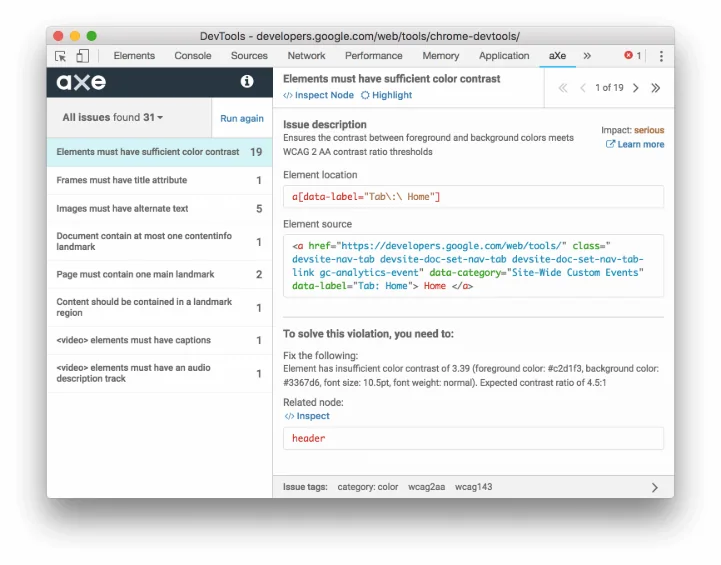
Automated analysis provides findings that still need human review.
Source · Chrome for Developers
Supported byW3C: Web Content Accessibility Guidelines 2.2
What an automated scanner cannot understand
A high score can coexist with invisible focus, confusing order, useless labels, or processes some people cannot complete.
How to test keyboard, screen reader, and zoom
Choose pages and tasks by risk. Evaluate against WCAG 2.2 but write findings as problems the team can reproduce and fix.
Implementation checklist
- Define scope by templates and critical tasks.
- Run automated analysis and review false positives.
- Test keyboard, focus, zoom, contrast, and motion.
- Review accessible names, errors, and semantic structure.
- Repeat tests after every correction.
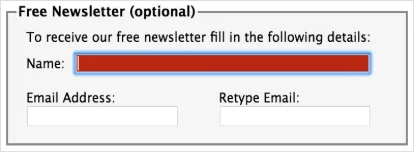
Visible focus shows which control will respond to keyboard input.
Source · W3C WAI
Supported byW3C: business case for digital accessibility
Priorities based on impact and frequency
Measure issues by severity, correction rate, regressions, task success, and coverage across components and templates.
Combine tools with human use
A scanner finds contrast, labels, and structural issues, but it cannot tell whether the order makes sense or an instruction is understandable. An audit needs both kinds of review.
Complete full tasks with a keyboard and screen reader. Inspecting isolated components misses focus that disappears between a dialog, form, and confirmation.
Prioritize barriers by severity and frequency. Fix first what prevents buying, contacting, understanding, or signing in.
Minimum audit sample
- Navigation and headings.
- Forms and error messages.
- Dialogs, menus, and focus.
- Text, color, and zoom.
Supported byGOV.UK: user research
Quick execution map
| Element | What to review | Quality signal |
|---|---|---|
| Intent | An accessibility audit combines automated tools with human tests on representative flows and records severity, evidence, and a verifiable correction. | The answer is clear within seconds. |
| Implementation | Choose pages and tasks by risk. Evaluate against WCAG 2.2 but write findings as problems the team can reproduce and fix. | There is one concrete and assignable action. |
| Measurement | Measure issues by severity, correction rate, regressions, task success, and coverage across components and templates. | The data should change a decision. A report with no action adds work. |
Frequently asked questions
What does website accessibility audit mean in practice?
An accessibility audit combines automated tools with human tests on representative flows and records severity, evidence, and a verifiable correction.
What is a sensible first step for website accessibility audit?
Define scope by templates and critical tasks. Then continue with this action: Run automated analysis and review false positives.
Which problem should website accessibility audit prevent?
A high score can coexist with invisible focus, confusing order, useless labels, or processes some people cannot complete.
How do you measure progress with website accessibility audit?
Measure issues by severity, correction rate, regressions, task success, and coverage across components and templates.