

Confirmation is the first task
A thank-you page confirms the action, summarizes what was submitted or purchased, explains timing and next steps, and offers help if something is wrong.
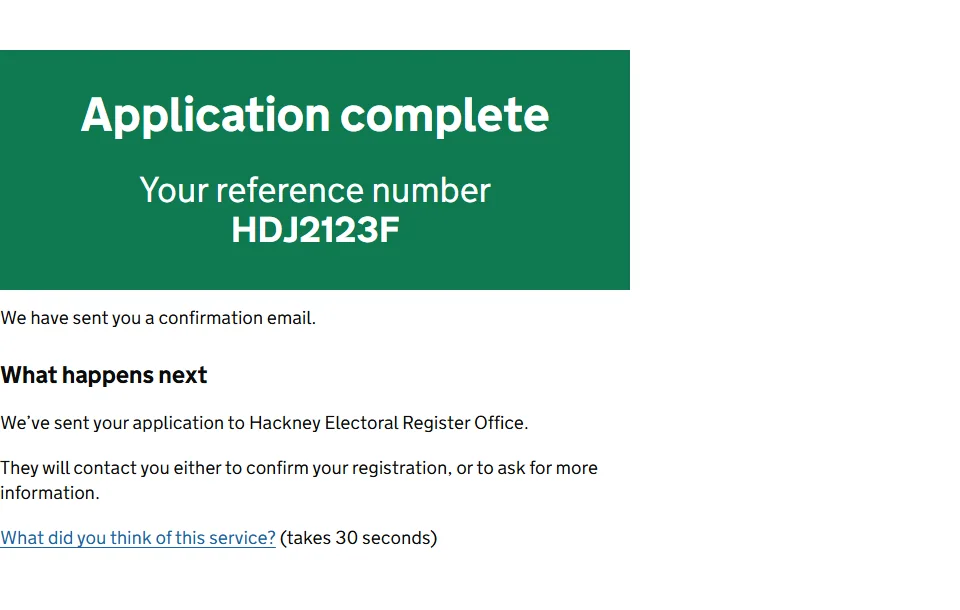
The confirmation combines the completed action, a reference, and what happens next.
Source · GOV.UK Design System
Supported byNielsen Norman Group: usability heuristics
What causes confusion after submission or purchase
A generic confirmation leaves doubt, creates duplicate contacts, and wastes a moment of high attention.
How to choose a useful next step
Design variants for each action. Confirmation and orientation come first; any additional recommendation should stay secondary.
Implementation checklist
- Confirm the action with an identifier when relevant.
- Explain who will respond, through which channel, and when.
- Show how to correct details or get help.
- Record the event without duplicating it on refresh.
- Offer one related resource with context.

After confirming the result, a secondary action can guide the next step.
Source · GOV.UK Design System
Supported byGoogle Analytics: GA4 events
Measurement without duplicate conversions
Measure unique events, repeated contacts, secondary clicks, response time, and reported discrepancies.
Confirm first, offer second
The page must confirm exactly what was received and when a response will arrive. Cross-selling should never compete with that certainty.
Match the next step to the completed action: prepare documents, check email, save a date, or learn how to use the product.
Measure secondary clicks without confusing them with the original conversion. The page is also a useful place to confirm that tracking fired correctly.
Essential content
- Visible, specific confirmation.
- Follow-up timing and channel.
- A genuinely useful next action.
- A contact for resolving problems.
Supported byGOV.UK: defining user needs
Quick execution map
| Element | What to review | Quality signal |
|---|---|---|
| Intent | A thank-you page confirms the action, summarizes what was submitted or purchased, explains timing and next steps, and offers help if something is wrong. | The answer is clear within seconds. |
| Implementation | Design variants for each action. Confirmation and orientation come first; any additional recommendation should stay secondary. | There is one concrete and assignable action. |
| Measurement | Measure unique events, repeated contacts, secondary clicks, response time, and reported discrepancies. | The data should change a decision. A report with no action adds work. |
Frequently asked questions
What does thank-you page mean in practice?
A thank-you page confirms the action, summarizes what was submitted or purchased, explains timing and next steps, and offers help if something is wrong.
What is a sensible first step for thank-you page?
Confirm the action with an identifier when relevant. Then continue with this action: Explain who will respond, through which channel, and when.
Which problem should thank-you page prevent?
A generic confirmation leaves doubt, creates duplicate contacts, and wastes a moment of high attention.
How do you measure progress with thank-you page?
Measure unique events, repeated contacts, secondary clicks, response time, and reported discrepancies.