
Redesign without erasing what works

A website redesign should preserve valuable assets, fix proven problems, and migrate URLs, measurement, and content through a verifiable plan.

A URL inventory is the starting point for preserving routes during a redesign.
Source · Screaming Frog
Supported byGoogle Search Central: site moves with URL changes
Risks a visual review does not catch
Starting with new screens hides SEO, form, integration, and content risks. Errors appear after launch when they cost more.
How to migrate content, SEO, and measurement

Create a baseline for traffic, conversions, URLs, and performance. Define acceptance criteria for every template before development.
Implementation checklist
- Inventory pages, rankings, links, and conversions.
- Decide what to keep, merge, update, or remove.
- Map redirects and metadata before development.
- Test forms, events, accessibility, and speed.
- Monitor errors, indexing, and conversion after launch.
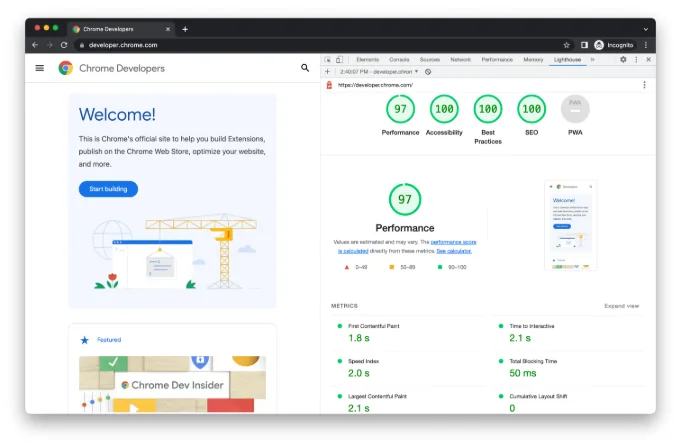
The prelaunch review should also check performance and accessibility.
Source · Chrome for Developers
Supported byweb.dev: Core Web Vitals metrics
Controls for the first few weeks
Compare organic traffic, rankings, 404 errors, Core Web Vitals, conversion, and form submissions against the baseline.
Protect what already works
Before redesigning, export URLs, traffic, conversions, and queries. That baseline prevents valuable pages from being removed because they look old.
Decide whether every URL stays, improves, redirects, or retires. Building the map after launch creates avoidable errors and losses.
Test forms, analytics, accessibility, and redirects in staging. A visual review covers only part of the risk.
Checks before launch
- A URL inventory and map.
- Content and measurement backups.
- Critical-task tests.
- A post-launch monitoring plan.
Supported byW3C: Web Content Accessibility Guidelines 2.2
Quick execution map
| Element | What to review | Quality signal |
|---|---|---|
| Intent | A website redesign should preserve valuable assets, fix proven problems, and migrate URLs, measurement, and content through a verifiable plan. | The answer is clear within seconds. |
| Implementation | Create a baseline for traffic, conversions, URLs, and performance. Define acceptance criteria for every template before development. | There is one concrete and assignable action. |
| Measurement | Compare organic traffic, rankings, 404 errors, Core Web Vitals, conversion, and form submissions against the baseline. | The data should change a decision. A report with no action adds work. |
Frequently asked questions
What does website redesign checklist mean in practice?
A website redesign should preserve valuable assets, fix proven problems, and migrate URLs, measurement, and content through a verifiable plan.
What is a sensible first step for website redesign checklist?
Inventory pages, rankings, links, and conversions. Then continue with this action: Decide what to keep, merge, update, or remove.
Which problem should website redesign checklist prevent?
Starting with new screens hides SEO, form, integration, and content risks. Errors appear after launch when they cost more.
How do you measure progress with website redesign checklist?
Compare organic traffic, rankings, 404 errors, Core Web Vitals, conversion, and form submissions against the baseline.